

Most advice on how to write a good LinkedIn post is optimized for the wrong scoreboard. It chases reactions, reach, and pretty copy, then calls the post successful even when it never surfaces a real buyer.
That's useless for a marketing director trying to prove pipeline. A post that lands with 500 relevant consulting or software leaders is often more valuable than one that gets seen by 20,000 students or generic professionals, because LinkedIn lets you read audience quality through job title, seniority, company size, and industry, not just the total number of impressions LinkedIn analytics help.
If you're serious about meetings, you need a different definition of performance. Saves, qualified comments, target-profile views, and meetings are the signals that matter, because they show buying relevance, not just public applause. For a useful comparison of organic reach versus meaningful attention, see this internal analysis on organic reach on LinkedIn.
Table of Contents
- Why Most LinkedIn Posts Never Reach a Buyer
- A Repeatable Five-Step Drafting Process
- Openers That Earn the Scroll
- Choosing Format and Length by Objective
- Sequencing Posts Across the Buyer Journey
- Timing, Testing, and Reading the Numbers
- Editorial Playbook and Pre-Publish Checklist
Why Most LinkedIn Posts Never Reach a Buyer
The usual LinkedIn post fails before the first sentence earns attention. It is written for engagement, not for a buyer journey, so it pulls in the wrong audience, pushes the wrong action, and gets judged by the wrong metric.
Reach is not relevance
A post can spread widely and still be commercially empty. Broad visibility often flatters the feed while adding little to the pipeline. A director sees activity, but not intent.
LinkedIn's own analytics make that plain. They do not stop at reactions. They also show viewer demographics such as job title, location, company size, industry, and seniority LinkedIn analytics help. That is the level that matters.
A good post does not ask, “How many people saw it?” It asks, “Did the right people do something?”
A post that reaches the right seniority is often a stronger commercial asset than one that goes wide among people who will never buy. That matters even more in long sales cycles, where a single impression means little without the next signal.
The job of the post
A senior profile is there to create intent. It should move someone from save to qualified comment to profile visit to conversation. That chain is what gets a prospect closer to a meeting.
Generic advice wastes time because it chases likes and treats style as the answer. The underlying issue is audience fit. If the post does not speak the language of a buying role, it will not create buying relevance.
A better post starts with one narrow business problem, uses the words the target decision-maker already uses, and ends with a low-friction next step. A useful viewer is not “anyone interested in marketing.” It is a VP of Marketing at a 200 to 1,000 person software company, or a Demand Generation Director at a regional consultancy, because those roles can connect the topic to budget, process, and meetings.
That is why broad reach analysis only matters when it is tied to quality, not vanity. For a wider comparison of organic reach and meaningful attention, see this analysis of organic reach on LinkedIn.
For a broader strategic view of why this matters on a mature professional network, LinkedIn's growth from early users to more than one billion shows why posts need to be specific and still understandable across markets LinkedIn's history and scale.
A Repeatable Five-Step Drafting Process
Good LinkedIn writing is a controlled process. If the post has to support pipeline, every line should serve a clear commercial purpose.
Step 1, name one problem the audience already feels
Pick the problem your target reader owns. Use something concrete, like proving pipeline impact or reducing dependence on events. Skip vague themes such as brand awareness, thought leadership, or social media presence.
If you cannot say the problem in one sentence, you are not ready to write. The sentence should sound like something a marketing director, partner, or sales leader would say in a meeting. That is the filter.
Step 2, open with tension, proof, or a contrarian point
The opener should do real work. Start with a friction point, a measurable result, or a challenge to common advice. Skip the polite intro and the vague setup that drains attention before the post has said anything useful.
For a post about reducing event dependence, a stronger opening line is: “Event-led demand looks busy on the dashboard and invisible in the pipeline report. Here is how we fixed that attribution gap.” That gets straight to the problem and tells the reader why the post matters.
Step 3, develop one idea with short paragraphs and operational detail
The body should explain one idea, not seven. Short paragraphs force discipline and make the post easier to read on mobile. Add operational detail, because abstract claims disappear fast in the feed.
A good example is a consulting firm post that shows how a partner-led account team uses one narrow subject, one proof point, and one call to action across several posts. Keep the language specific enough that a peer can picture the same approach in their own team next week. If the reader can only nod politely, the post is too soft.
Step 4, choose a format that supports the idea
Format is part of the argument. A framework belongs in a document or carousel, a demonstration belongs in native video, and a personal interpretation often works best as text.
Use the format that matches the job of the post. If the goal is education, choose the shape that makes the idea easy to save or revisit. If the goal is persuasion, choose the shape that makes proof visible fast. For a practical breakdown of content formats, use the dedicated format section.
Step 5, end with one low-friction next step
Do not end with three questions and two calls to action. That diffuses the response. Ask for one comment, one save, one example, or one reaction tied to the topic.
The best LinkedIn posts behave like a conversation starter, not a brochure. They earn the next interaction instead of demanding it.
Treat the post as one stage in a sequence. A problem post earns attention, an evidence post earns trust, and an implementation post earns commercial relevance. That is how you build momentum without sounding like you are selling in every line.
Openers That Earn the Scroll
The first line decides whether the rest of the post gets a fair hearing. Most weak posts die because the opening is polite, safe, or generic. Senior buyers don't reward that.
Four opener patterns worth using
A tension opener names an unresolved business problem. “Your event pipeline looks healthy until you try to explain it to finance.” That line works because it points to a real internal conflict.
A number opener leads with a result or a hard fact. Use it when the post needs credibility immediately. “We stopped treating partner posts as branding and started treating them as a pipeline signal.” That's stronger than a soft lead-in.
A contrarian opener pushes back on common advice. “More LinkedIn activity won't fix a weak commercial message.” It creates instant disagreement, which earns attention from the right reader.
A story opener sets a scene in one or two sentences. “A partner in Madrid sent me three drafts last quarter. The strongest one wasn't the longest, it was the clearest.” That gets to the point without theatrical nonsense.
For help with the mechanics of attention-grabbing copy, this resource on create scroll-stopping content is a solid companion.
What to avoid instead
The lazy openers are easy to spot. “I'm excited to announce” tells the reader nothing. “In today's world” sounds like filler before the actual point. “Here are 5 reasons” often means the post is about to become a list with no commercial spine.
A stronger opener earns the scroll because it makes the reader feel the post was written for a real problem. If the first line could sit under almost any topic, it's not doing enough work.
Choosing Format and Length by Objective
Format and length should serve the outcome, not habit. A LinkedIn post is doing a job in the buyer journey, and the format should match the next signal you want, whether that is a save, a qualified comment, a profile view, or a meeting. Audience size matters too, but it does not decide the format on its own.
| Format choice by objective and audience size | Best objective | Strongest audience size | Watch out for |
|---|---|---|---|
| Text | Personal interpretation, contrarian takes, quick relevance | Smaller to mid-sized expert audiences | Burying the point in setup |
| Single image | One memorable idea, one proof point, one simple insight | Smaller audiences or highly visual ideas | Decorative visuals that don't add meaning |
| Document or carousel | Frameworks, step-by-step education, content worth saving | Larger audiences and expert-led posts | Too many ideas in one asset |
| Native video | Demonstration, proof from a senior voice, trust-building | Audiences that already know the author | Overproduced clips with weak substance |
Text works when you need a point of view to land fast. It fits a sharp opinion, a lesson from experience, or a commercial insight that should lead to a conversation. If the post needs the reader to think before they move on, text usually does the job better than a polished visual.
Documents and carousels fit posts that should be saved, shared, or revisited later. They work well for frameworks and step-by-step explanations because the structure gives the reader a reason to come back. Native video makes sense when trust depends on seeing and hearing the senior voice behind the idea.
Length follows the same rule. Short text can surface tension quickly. Longer text works when the post has to explain a buying signal, show the logic behind it, or connect the point to a commercial decision. If the reader should act next week, choose a document. If the reader should agree with you, choose text.
The lazy advice to keep every post short wastes good ideas. The opposite mistake is padding a post until it feels important. The right length is the shortest version that still makes the problem clear, states the point cleanly, and gives the reader a next step.
For format selection, the practical guide on content format decisions is useful. Use it to match the format to the action you want.
Sequencing Posts Across the Buyer Journey
One post rarely creates a meeting. The job is to move a reader through a sequence, from awareness to trust to commercial relevance, without repeating the same pitch every time.
A month built around one narrow problem
Start with a problem post. That post names the pain point in plain language, such as the hidden cost of relying on trade shows for pipeline. Don't sell yet, just make the problem legible.
Follow with an evidence post. Use a specific example, an observed pattern, or a client-side lesson that shows why the problem matters. The point is not to boast. The point is to prove that the issue is real.
Then publish an implementation post. Explain how a team can respond, what gets changed first, and what gets ignored. Senior readers start seeing how the idea could work in their own organisation here.
Finish with a relevance post. Connect the topic to a concrete commercial outcome and make the next step obvious. That might be a question, a conversation, or an invitation to compare approaches.
A consulting firm trying to reduce event dependence could run that sequence over a month. One post on the hidden drag of event-led demand, one on what partner-led content surfaces, one on how to shift a narrow editorial rhythm, and one on how that pattern supports pipeline conversations.
Keep the commercial problem consistent
The mistake is jumping from one topic to another just to stay active. That produces noise, not momentum. Consistency means staying inside one commercial problem until the audience understands why it matters.
LinkedIn's own marketing guidance says prospects engage with roughly 10 pieces of content before they make a purchase decision LinkedIn marketing tactical plan. That's exactly why your posts need to sequence, not scatter.
If you post once from each of five unrelated topics, you're making the reader reset every time. If you stay on one business issue and move it forward each week, you earn the right to ask for a meeting later.
Timing, Testing, and Reading the Numbers
Timing advice gets oversold. Controlled testing beats folklore every time, especially when the audience is narrow and the outcome needs to be commercial.
Run one clean test, not a guessing game
Use one topic and one author, then publish four comparable variants. Two should be text posts, one should be a document or carousel, and one should be native video. Keep the audience, subject, and call to action as stable as possible.
Then compare rates, not raw totals. Look at engagement per impression, qualified-comment rate, profile-view rate, click-through rate, and meeting conversion rate. Raw engagement can flatter the wrong post if the distribution was broader or the audience was less relevant.
Read the analytics like a buyer
Saves matter because they show the post had enough value to revisit. Comments matter when they come from the right seniority and function, not from random approval. Profile views matter when they come from the roles you want to attract.
The demographics panel is where the truth lives. If the engagement comes from the wrong titles or irrelevant companies, the post may still look active while doing nothing for pipeline. That's why the audience quality check should sit beside the performance check.
For a structured way to track this, the performance guide at LinkedIn post tracking is a useful companion.
Don't reward a post just because it was popular. Reward it when the right people moved closer to a conversation.
As a practical rule, test across several posts per cell, not one isolated publish. One good result can be luck. A pattern is what gives you confidence to repeat the approach.
Editorial Playbook and Pre-Publish Checklist
The best teams stop improvising every post. They build a simple editorial system and use it every time, especially when senior profiles are involved.
The checklist I'd actually use
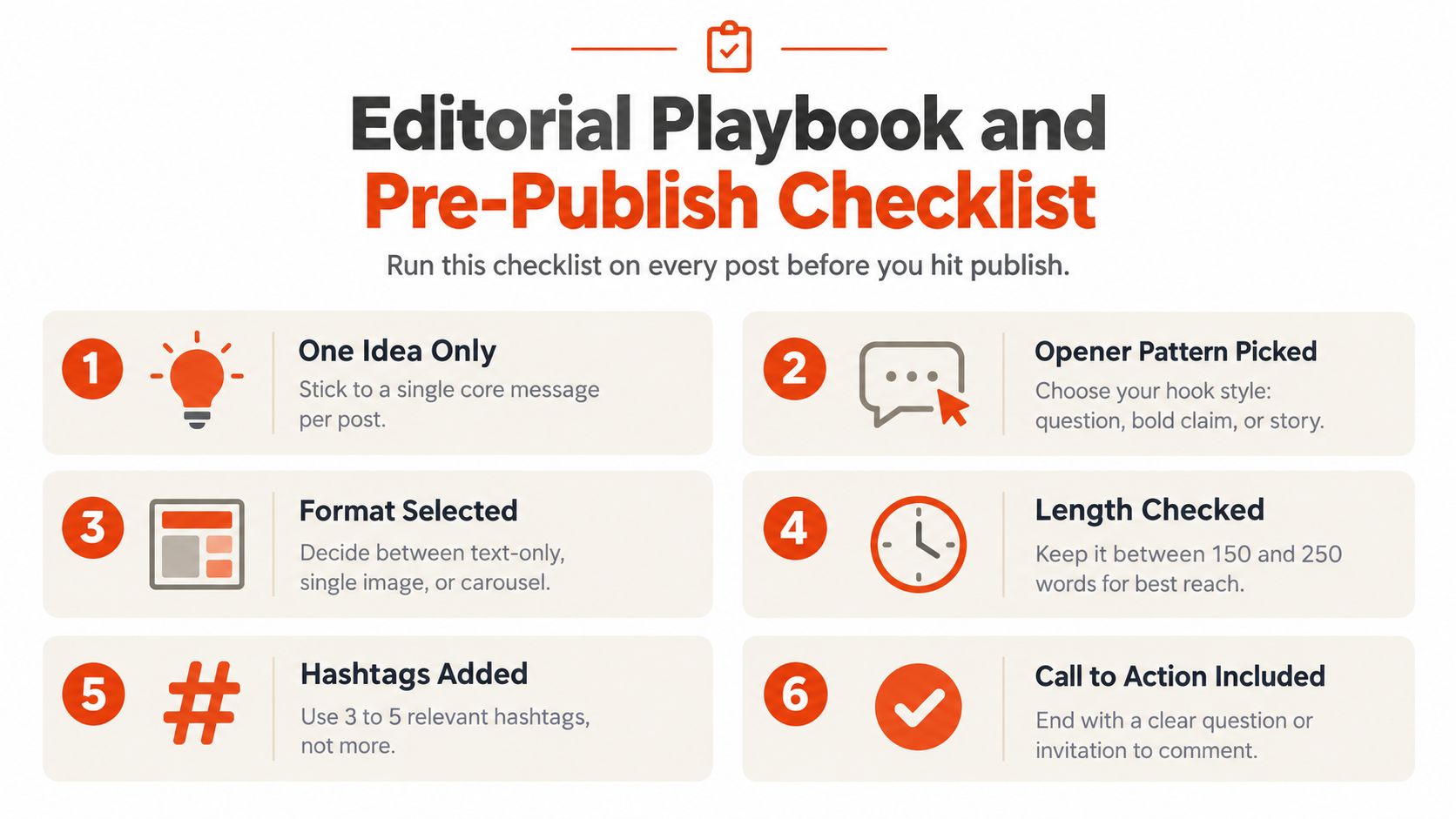
Before you publish, check five things. One idea only. One opener pattern chosen. One format matched to the objective. One proof point or real example included. One low-friction next step at the end.
After publishing, review the top and bottom performer each week. Compare the rate-based metrics, check the audience panel, and note what kind of comment quality you received. That's better than obsessing over likes.
A simple resource like the social media posting guide for solopreneurs can help with habits and cadence, but senior B2B profiles need a stricter commercial filter than generic posting advice usually provides.
The common traps are always the same. Engagement bait. Vague claims. Multiple calls to action. External links dropped before the value is established. Senior profiles waste too much time on all of them.
If you want meetings, pick one narrow commercial problem, one senior author, and one month of controlled testing. Judge the result by saves, qualified comments, profile views, and meetings. Everything else is decoration.
Ploot helps B2B teams turn senior LinkedIn profiles into a measurable sales channel, so the writing and the follow-up both support pipeline. If you want a system that connects LinkedIn posts to qualified meetings instead of vanity metrics, visit Ploot and see how it fits your team.