

LinkedIn audience targeting is often treated as a filtering exercise. Pick a job title, add an industry, narrow the company size, and trust the estimated audience. That workflow looks precise, but it confuses targetable profiles with reachable buyers. A person can match your criteria and still have no role in the purchase, no current need, or no influence over the buying committee.
The platform is still unusually valuable for B2B. LinkedIn's advertising audience exceeded 1 billion people in 2024, representing about 12.7% of the global population and 19.2% of internet users, according to DataReportal's Digital 2024 LinkedIn statistics summary. The opportunity is large. The hard part is making sure your budget reaches the right people at the right companies when a problem is active.
Table of Contents
- Why LinkedIn Audience Targeting Quietly Fails in B2B
- The Core Targeting Options on LinkedIn
- The Hidden Reliability Problem in Profile Data
- Layering Account Data and Matched Audiences
- Predictive Audiences and Buyer Groups Explained
- Narrow Title Targeting vs Broad Layered Targeting
- Using Intent Signals to Find Active Buyers
- A Practical Targeting Checklist for B2B Marketers
Why LinkedIn Audience Targeting Quietly Fails in B2B
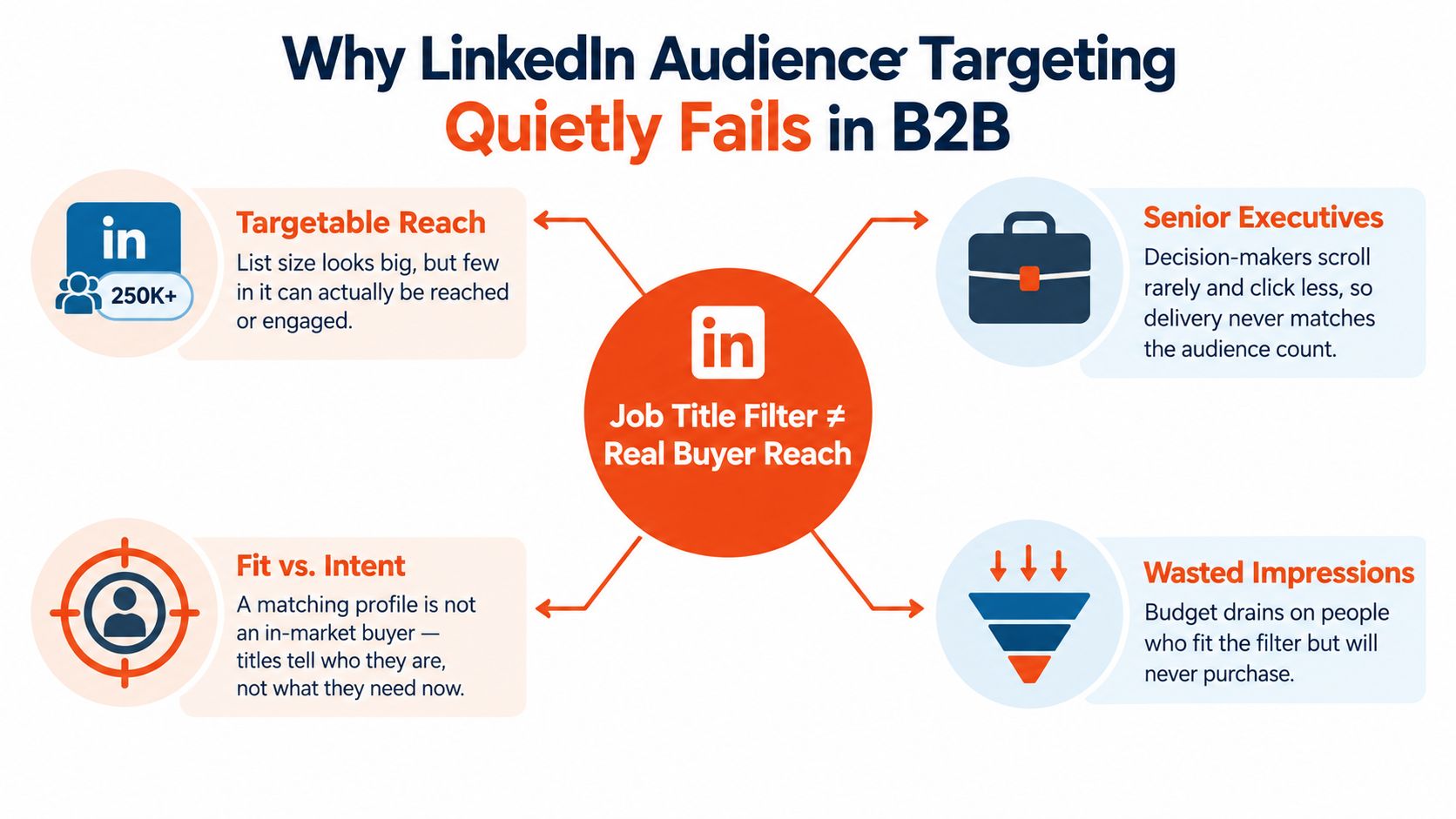
A job title filter isn't a buying committee. It's a description of how someone presents their role on a professional profile.
That distinction causes most LinkedIn audience targeting failures. A campaign aimed at “VP Marketing” may reach a current vice president, a former vice president who hasn't updated their profile, a consultant using the title for a side business, or someone who influences marketing without owning the decision. The filter is technically working. The campaign is still commercially wrong.
Senior decision-makers may use LinkedIn irregularly, while more junior employees can be highly active and visible. Procurement, finance, security, legal, and operations may influence the purchase without appearing in the title list you started with. A title-only audience therefore creates a false sense of control, especially in consulting and software sales where several people shape the decision.
Reach is not accuracy
LinkedIn's audience composition does make it relevant to professional targeting. Industry summaries report that roughly four out of five members can influence business decisions, while more than half of U.S. users come from households earning above $100,000. The same summaries report that 53% of college graduates use the platform, compared with 10% of people without a degree. These figures come from Leadfeeder's LinkedIn statistics overview, but they don't prove that every matching profile is in market.
They show why the platform deserves attention. They don't remove the need for verification.
Practical rule: Treat every profile attribute as a clue, not as proof of buying authority or current intent.
The reliable approach combines account context, professional attributes, exclusions, and behavioral signals. A target account list tells you where the opportunity exists. Function and seniority help identify likely participants. Engagement and website activity suggest who is paying attention now. Creative and landing-page behavior provide another layer of qualification.
The objective isn't the largest eligible audience. It's an audience where impressions have a credible path to a sales conversation.
The Core Targeting Options on LinkedIn
Think of LinkedIn targeting as postal sorting. Professional attributes are the address on the envelope. Matched Audiences are forwarding lists. Predictive tools are sorting machinery that learns which routes produce useful deliveries. Each layer has a job, and none should carry the whole campaign alone.
Start with the address. Company, company size, industry, geography, job function, job title, seniority, skills, education, and experience describe the person or organisation you want to reach. Geography is required, while LinkedIn's own targeting checklist warns that stacking too many facets can restrict delivery. Its guidance supports beginning with broad geography and a small number of meaningful facets rather than building an audience that exists only in theory.
Then add audience context. Interests, groups, and member traits can help with message relevance, but they usually make weaker foundations for high-value B2B campaigns than company and professional data. A broad management category may be useful for discovery. A narrow skills or group filter can be more restrictive than expected, and membership doesn't necessarily indicate budget ownership.
What each option actually does
| Filter | What It Targets | Best Used For | Reliability |
|---|---|---|---|
| Company and company size | Organisations and their scale | Account selection and firmographic fit | Stronger when based on named accounts |
| Industry | LinkedIn's classification of an organisation | Market segmentation and exclusions | Useful, but categories can be broad |
| Job function | A professional area such as marketing or sales | Reaching adjacent buying roles | Generally more flexible than titles |
| Job title | A profile's stated role | Testing known buyer language | Vulnerable to stale or inconsistent data |
| Seniority | Career level or organisational position | Separating practitioners from leaders | Helpful as a layer, not a complete persona |
| Skills and education | Declared capabilities and background | Niche relevance or message testing | Can be self-selected or incomplete |
| Interests and groups | Declared or inferred topics and communities | Content distribution and discovery | Better for themes than purchase authority |
| Matched Audiences | Uploaded accounts, contacts, visitors, or converters | First-party and account-based activation | Strong when source data is clean and current |
| Predictive and buyer-group tools | Modeled likely buyers and committee roles | Expansion beyond known profiles | Depends on seed quality and engagement data |
LinkedIn supports AND and OR logic across targeting criteria and matched-audience inputs, as described in its audience targeting documentation. Use AND to protect relevance, such as a target account plus a relevant function. Use OR to add a separate warm audience, such as people who engaged with a specific asset.
For a practical view of how senior roles and buyer relevance fit together, this guide to high-value buyers is useful context. For campaign architecture beyond audience selection, connect the targeting plan to your LinkedIn lead generation process so form submissions, qualification, and sales follow-up use the same definitions.
The Hidden Reliability Problem in Profile Data
LinkedIn profiles look structured because the interface presents neat fields. The underlying information is still supplied, maintained, and interpreted by people.
A title can remain unchanged after a promotion or job move. An industry category can follow a person from a previous employer. Skills can be added because they help profile visibility rather than because they describe the person's current remit. A profile can also combine personal interests, side projects, board positions, and professional responsibilities in ways that make a single field misleading.
Four ways targeting drifts
Stale titles create false positives and false negatives. A former marketing leader may still match an executive campaign, while a current buyer with an unconventional title may never qualify. The campaign pays to solve both problems, but only one is visible in Campaign Manager.
Inherited industry categories blur the account picture. A specialist consultancy, software company, and services firm can be grouped in ways that don't reflect your ideal customer profile. If industry is the primary filter, your creative may reach organisations with very different buying processes.
Self-selected skills are signals of identity, not necessarily evidence of active responsibility. A person may list a technology because they once used it, want to work with it, or support a colleague who owns it. Skill targeting can help with content themes, but it shouldn't determine sales priority by itself.
Blended activity creates another trap. LinkedIn can show a person's professional identity while their engagement reflects a broad mix of work and personal interests. A click demonstrates attention to an ad, not automatic fit for a high-value opportunity.
A profile tells you who someone may be. Account data and behavior tell you whether they deserve budget now.
A campaign aimed at “VP Marketing” can therefore spend heavily on people who technically match while missing a revenue operations leader, managing director, or commercial director who owns the problem. The remedy is not to abandon profile data. It is to stop treating one field as authoritative.
Keep the audience plan connected to CRM ownership, account status, and lifecycle stage. A clean CRM integration workflow helps teams compare what LinkedIn believes about a person with what sales knows about the account.
Layering Account Data and Matched Audiences
Matched Audiences are most useful when they add first-party context to professional targeting. They shouldn't replace firmographic logic. An uploaded company list can identify the accounts worth pursuing, but it doesn't tell LinkedIn which people inside those accounts matter.
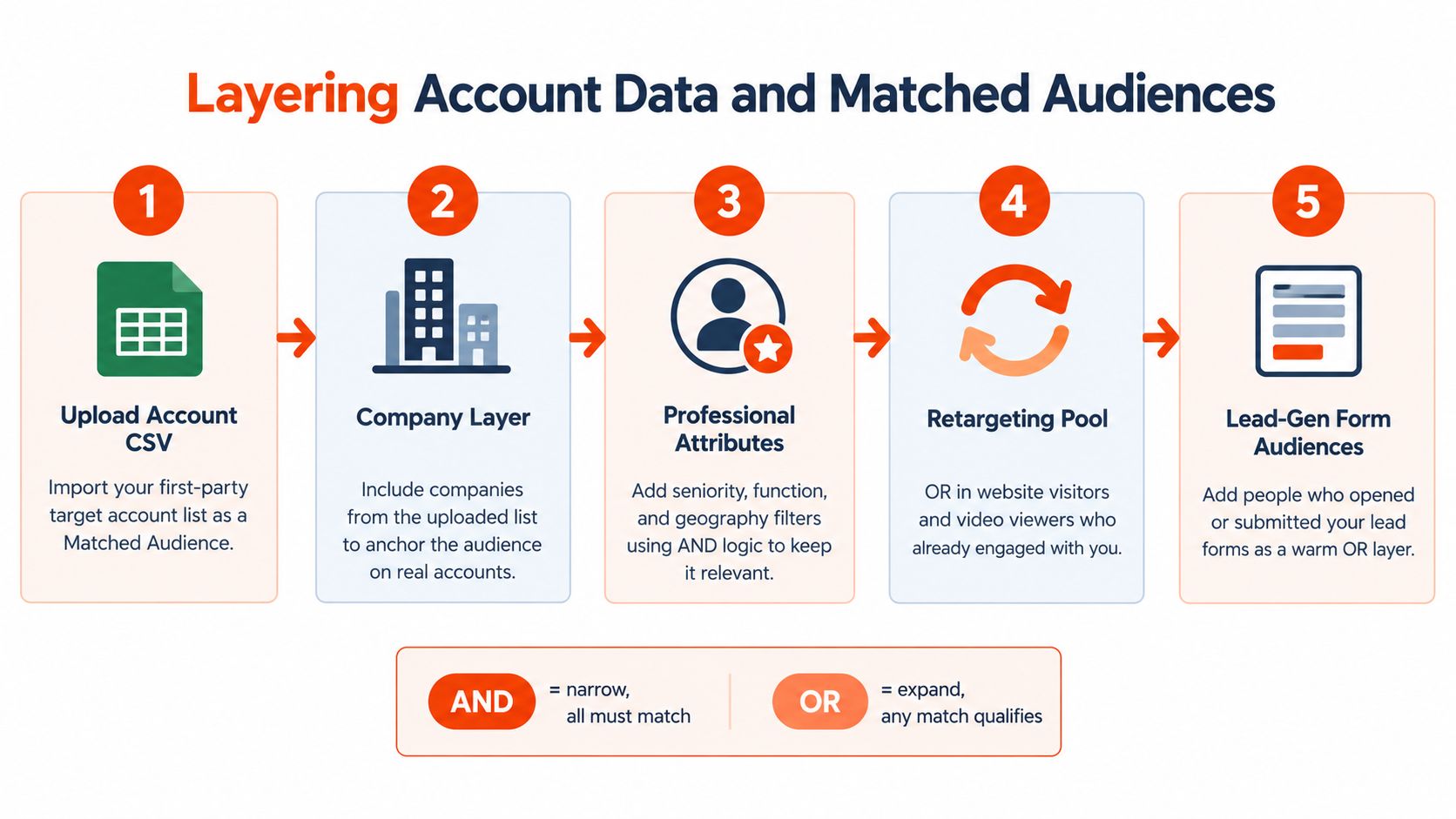
Start with a clean account file. Standardise company names, use the identifiers available in your CRM, remove duplicates, and separate active targets from customers, partners, competitors, and disqualified accounts. Upload the target account list as a company Matched Audience, then use it as the foundation of an account-based campaign.
Build the audience in layers
Anchor the campaign on accounts. Include the companies on your approved list. This prevents broad industry targeting from pulling in organisations that resemble your ICP but aren't commercially relevant.
Add professional context with AND logic. Layer job function, seniority, geography, or a carefully chosen title family. The person should match the account condition and the professional condition, not merely one of them.
Create separate role groups. Keep economic buyers, operational champions, technical evaluators, and users in distinct campaigns or ad groups where possible. Each group needs a different reason to respond.
Use OR logic for warm demand. Add people who visited a relevant page, engaged with a specific ad, or interacted with a lead form. Keep the definition narrow enough that the behavior has meaning.
Exclude waste deliberately. Remove existing customers when the campaign is for net-new acquisition. Exclude converted leads from prospecting when the next action belongs in nurture or sales follow-up.
The logic matters more than the upload
The most common mistake is uploading a list and assuming the campaign has become account based. It hasn't. A list without professional filters can reach irrelevant employees. Professional filters without a list can reach the right roles at the wrong companies. The useful combination is account plus role plus behavior.
A similar principle applies when researching hiring or organisational change. A resource such as account builder hiring skills can help marketers think about account signals as evidence of business movement, not merely as names to place in a spreadsheet.
Keep each audience's purpose clear. One segment might identify net-new contacts at target accounts. Another might re-engage known visitors. A third might support post-form follow-up. When these groups are mixed together, reporting becomes vague and sales can't tell whether a response came from account fit, content interest, or an existing relationship.
Predictive Audiences and Buyer Groups Explained
Predictive Audiences and Buyer Groups address the part of the reliability problem that manual title selection can't solve. Instead of asking only, “Which profiles have this title?”, they help answer, “Which people resemble the profiles and accounts that have already shown value?”
LinkedIn describes Predictive Audiences and Buyer Groups as AI-supported tools that use member engagement data to identify more relevant B2B audiences, as outlined in its AI, data, and B2B marketing analysis. The strategic shift is important. LinkedIn's lookalike audiences were retired in 2024, and predictive audiences now represent a move away from manually reproducing a narrow customer profile.
Predictive expansion
A predictive audience starts with a seed, such as converters, qualified leads, or high-fit accounts. LinkedIn uses that reference set to find additional people who share relevant patterns. The benefit is less dependence on creating every possible title variation, particularly where companies use inconsistent role names.
The risk is seed contamination. If the source list contains poor-fit leads, outdated contacts, or people who converted for an unrelated reason, the model can expand the wrong behavior. A predictive audience doesn't repair weak CRM definitions. It scales them.
Refresh the seed as the sales definition of quality changes. Compare predictive expansion against a manually controlled account campaign, and judge both on qualified conversations rather than cheap engagement.
Buyer-group modeling
Buyer Groups are useful when one person rarely completes the purchase alone. Define the roles that typically participate, such as economic buyer, champion, technical evaluator, and end user. The platform can then help identify and balance potential participants across that group instead of concentrating delivery on one familiar title.
| Feature | Best For | Minimum Seed | Main Risk |
|---|---|---|---|
| Predictive Audiences | Expanding from known converters or high-fit accounts | A clean, representative source audience | Expansion can inherit weak source data |
| Buyer Groups | Reaching several roles in a complex purchase | A credible definition of committee roles | Teams may model titles instead of real buying responsibilities |
| Manual account targeting | Controlled ABM and transparent testing | A verified target account list | Reach can become too narrow |
| Retargeting audiences | Follow-up with known engagers and visitors | Meaningful first-party behavior | Broad engagement definitions dilute intent |
The practical default is a controlled test. Keep one audience anchored to verified accounts and another using predictive expansion. If the predictive version generates engagement from the wrong functions or companies, narrow the seed and review the committee definition before changing creative.
Narrow Title Targeting vs Broad Layered Targeting
The narrow approach feels safer. A marketer selects “VP Marketing,” adds a sector, chooses a company-size range, and expects the auction to deliver a concentrated group of buyers. That structure can work when the market uses consistent titles and the account universe is already tightly defined.
It fails when job names vary across companies or when the actual champion sits outside the assumed department. A revenue operations leader may own the workflow. A managing director may approve the consultancy. A technical evaluator may block the purchase. None of them is guaranteed to carry the title you selected.
What narrow targeting does well
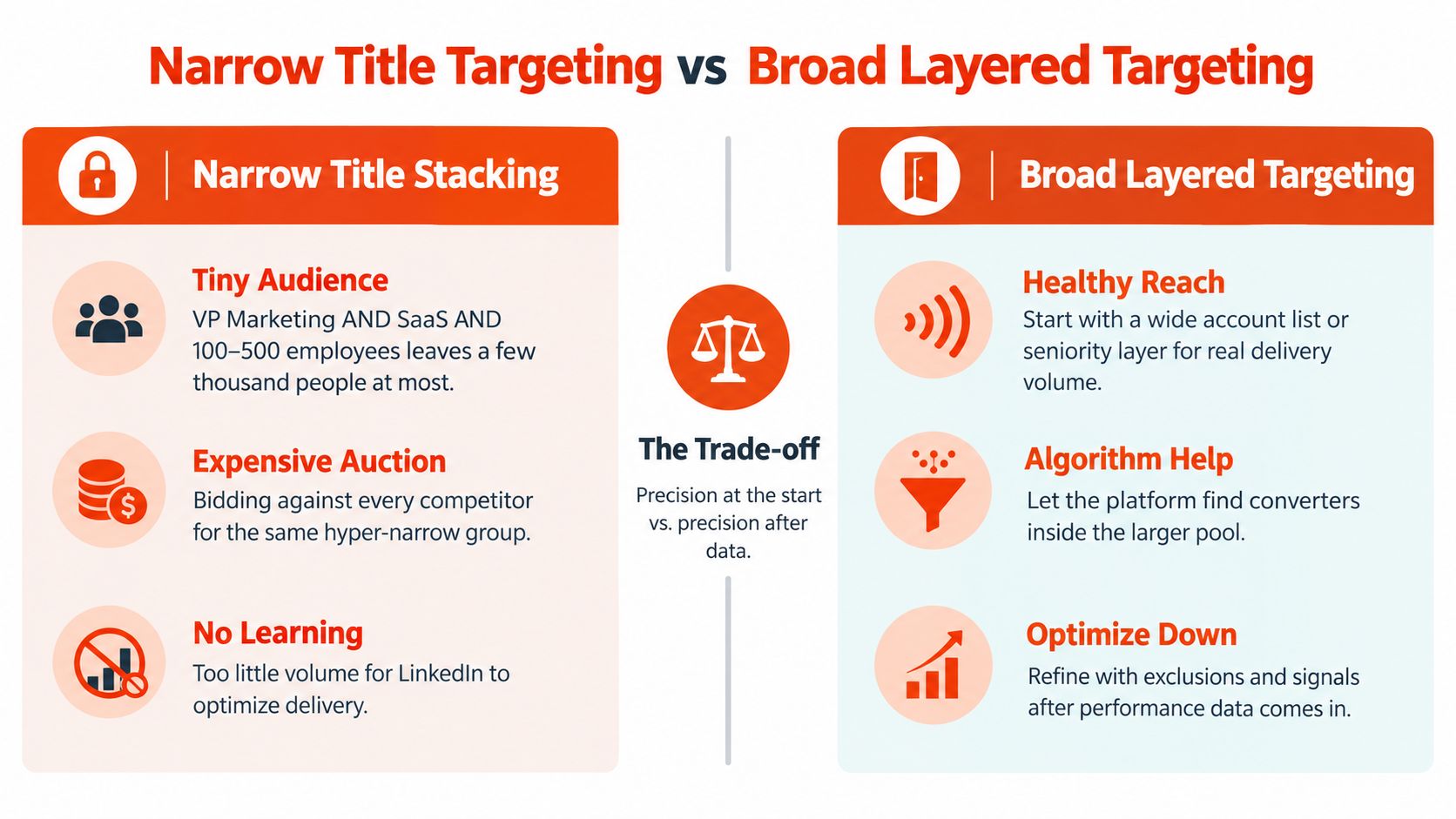
Narrow title targeting gives sales a simple story about who saw the campaign. It can make creative testing easier because the audience appears homogeneous. It also helps when the offer is role-specific, such as a technical integration guide for a clearly defined specialist audience.
The trade-offs are substantial:
- Audience compression: Several precise conditions can remove useful adjacent roles.
- Auction pressure: A small, attractive audience can become expensive because many advertisers want the same senior profiles.
- Weak learning: If too few people engage or convert, the platform has little behavioral evidence to use for delivery.
- Title blindness: The campaign can miss people who influence the decision under different names.
Broad layered targeting reverses the order. Start with a credible account list or a useful seniority band. Add a flexible function layer. Use the message to qualify the problem, then use engagement and website behavior to identify the people who lean in.
Choose based on evidence
Use narrow targeting when the account list is broad, the role is standardised, and the offer requires specialist knowledge. Use broad layered targeting when you have named accounts, uncertain title conventions, or a buying committee with several plausible entry points.
The strongest compromise is often an account-first structure with broader professional criteria. Keep the account boundary tight, let several relevant functions qualify, and build separate creative for each problem. Retarget people who engage with the role-specific message rather than assuming the original title was accurate.
Precision can be the starting point, or it can be the outcome. In complex B2B, it is often safer to earn precision through behavior.
Using Intent Signals to Find Active Buyers
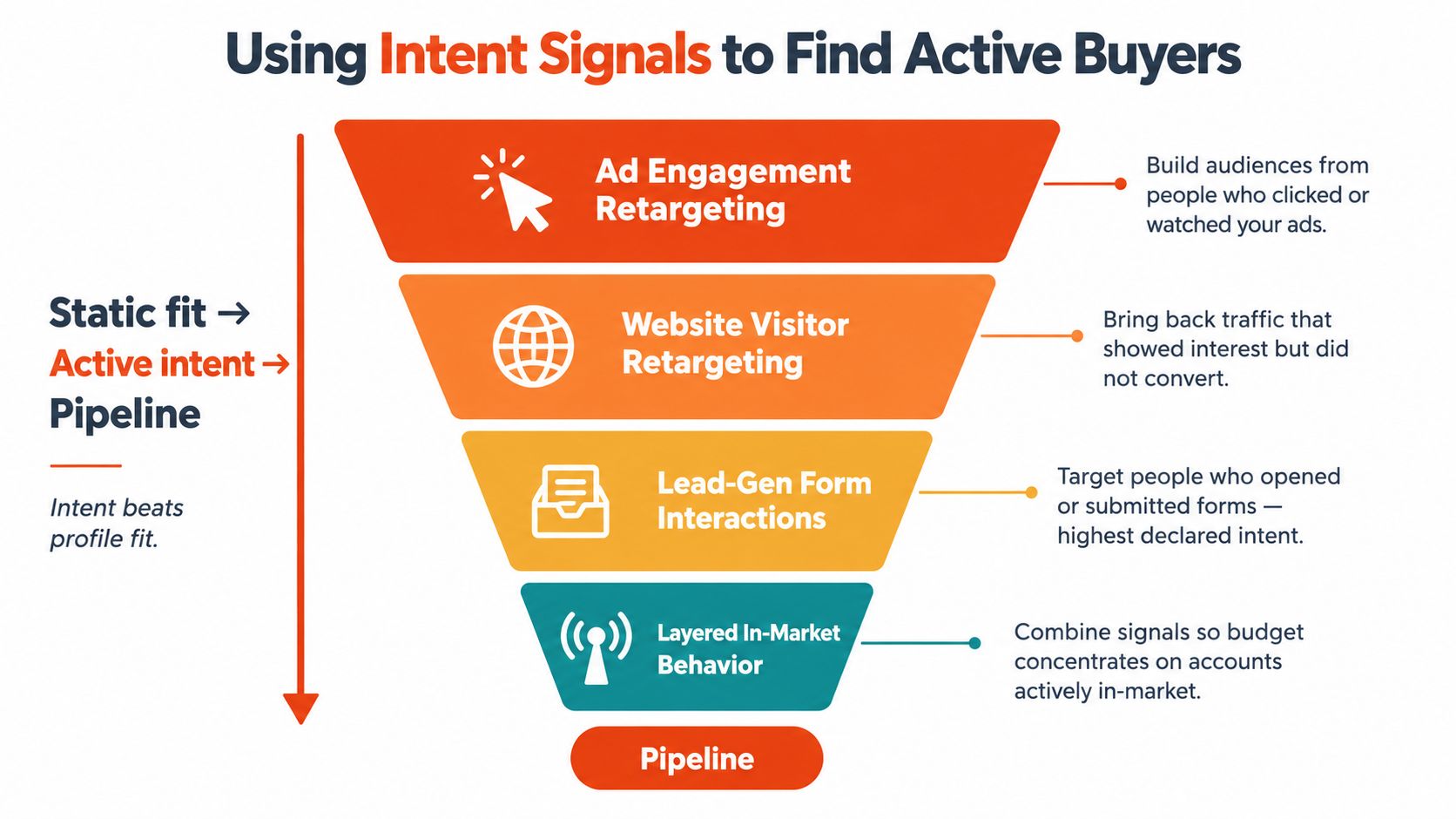
Static attributes tell you who might fit. Intent signals tell you who is paying attention now. That difference determines whether LinkedIn audience targeting supports pipeline or merely produces a plausible reach report.
Ad engagement is the first useful signal. Someone who clicks a comparison asset has expressed more interest than someone who was eligible to see it. Build a retargeting audience around a specific topic, not around every interaction your account has ever generated. A person who engaged with a pricing or implementation message deserves a different follow-up from someone who watched an introductory brand video.
Website activity adds context. A visitor to a service page may be researching a category. A visitor who returns to an integration, case-study, or pricing page has given your team a stronger reason to change the message. Lead-gen form interactions are more explicit still, but an opened form isn't the same as a qualified opportunity.
Company-level signals can also help. A sudden increase in engagement from people associated with a target organisation may justify coordinated sales and marketing attention. Third-party intent topics from providers such as Bombora or 6sense can add another layer, but they should be treated as directional evidence and matched against account fit.
Sequence signals instead of collecting them
Consider a hypothetical sequence. A revenue operations manager at a software company downloads a comparison guide, later sees a retargeted pricing message after visiting the relevant page, and then receives a case-study ad addressing implementation risk. The sequence is stronger than any individual action because the topic stays coherent while the message responds to deeper evaluation.
Don't retarget every video viewer with a demo. Don't send a case study to someone whose only interaction was a broad awareness impression. Define the behavior, the buying-stage interpretation, and the next useful message before building the audience.
For teams that need to connect behavioral evidence to outreach, LinkedIn signal detection provides a useful reference point for thinking about active interest rather than profile fit alone.
A Practical Targeting Checklist for B2B Marketers
Give this checklist to the person managing Campaign Manager and CRM operations. The sequence is designed to expose unreliable assumptions before the team adds more budget.
Audit the current audiences
- Export audience definitions: Record every company, title, function, seniority, industry, and behavior condition.
- Compare against CRM records: Check whether engaged contacts belong to target accounts and valid lifecycle stages.
- Inspect false positives: Sample people who clicked but never progressed and identify the field that admitted them.
- Separate audience purposes: Keep prospecting, customer expansion, event follow-up, and retargeting distinct.
Remove vanity filters
- Delete redundant title variants: Keep role families that reflect how your market names responsibilities.
- Challenge broad categories: Test whether management, interest, or industry filters add qualified engagement or just volume.
- Exclude known waste: Remove customers, competitors, partners, employees, and disqualified accounts from net-new campaigns.
- Review creative fit: Use a post analyzer for LinkedIn content to check whether the message clearly names the intended problem and audience.
Build one account-based control
- Create a verified account list: Use CRM ownership, ICP criteria, and sales exclusions.
- Layer professional context: Add function, seniority, and geography with AND logic.
- Split committee roles: Give economic buyers, champions, evaluators, and users different messages.
- Keep a control campaign: Compare account-first targeting with any broader expansion so reach doesn't hide quality differences.
Test predictive expansion carefully
- Use a clean seed: Start with contacts or accounts that sales considers genuinely valuable.
- Keep the definition stable: Don't change the source audience while judging the expansion.
- Compare downstream quality: Review qualified replies, meetings, and accepted opportunities, not only clicks.
- Refresh deliberately: Update the source as your ICP and conversion definitions change.
Wire intent into follow-up
- Name the trigger: Specify whether the audience reflects an ad click, page visit, form interaction, or account-level activity.
- Match the next message: Move from education to proof, objection handling, or a commercial action.
- Alert sales with context: Send the topic and account activity, not just a vague “engaged” label.
- Review on a fixed cycle: Give campaigns enough time and conversion evidence to learn before making constant edits.
Targeting on LinkedIn is an accuracy discipline, not a reach exercise.
Ploot helps B2B teams build LinkedIn audiences around relevant partners, directors, and senior managers, detect buying intent, and contact interested people at the right moment. If your team needs to turn audience activity into qualified meetings rather than impressions, visit Ploot and review how its audience-building and signal-based outreach can fit your sales process.